




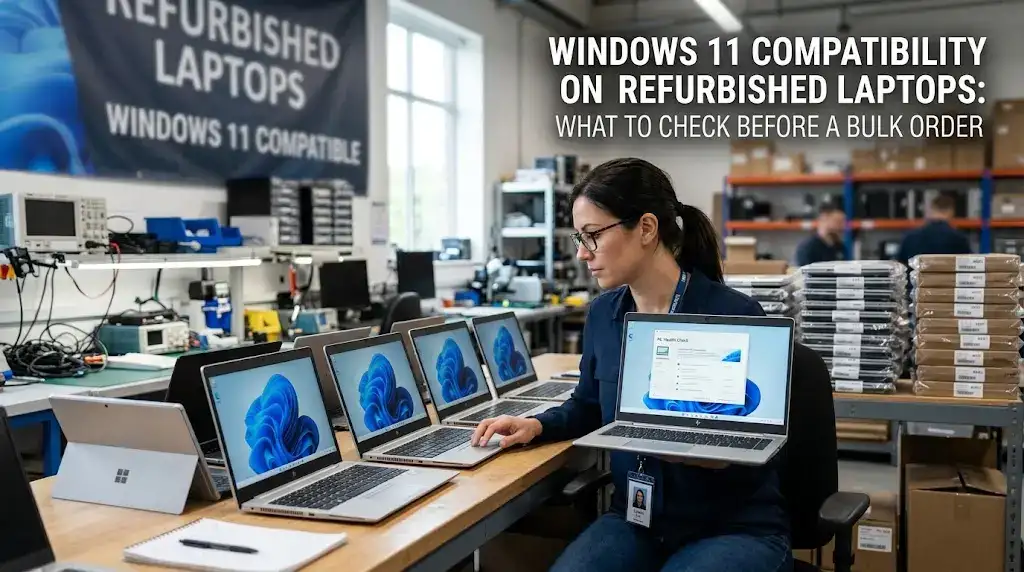
Windows 10 support ended on October 14, 2025, and many businesses are now refreshing their fleets with refurbished laptops instead of new ones. That is a sound way to control costs, as long as the laptops can run Windows 11. A unit can look clean, boot quickly, and still fail the upgrade check. The cause is usually the processor, not a fault in the machine.
This guide covers what Microsoft requires, which laptop generations pass, how to check TPM and Secure Boot, and what to verify before you commit to a lot.
Microsoft publishes lists of supported processors, and they are the first filter. Unlike a BIOS setting, a processor cannot be changed, so a laptop with an unsupported chip is out regardless of its other specs.
For Intel, most 8th-generation Core processors and newer are supported. Most 7th-generation chips are not, apart from a small set of exceptions such as some Core X-series and Xeon W chips. Eighth-generation laptop chips arrived in late 2017, but manufacturers kept selling older chips for a long time after that, so a 2018 purchase date proves nothing.
For AMD, the general rule is Ryzen 2000 series and newer. Be careful with names, though. Some mobile chips numbered in the 2000 range, such as the Ryzen 5 2500U, use first-generation Zen cores and are not supported. Always check the exact processor model against Microsoft’s list instead of relying on the series name.
| Component | Windows 11 Minimum | Details & Explanation |
|---|---|---|
| Processor | 1 GHz or faster, 2 or more cores, on Microsoft’s supported list | 8th-gen Intel, AMD Zen 2, or newer. |
| RAM | 4 GB | Baseline required for system operation. |
| Storage | 64 GB | Additional space needed for updates. |
| Firmware | UEFI, Secure Boot capable | Protects against boot-level malware. |
| TPM | Version 2.0 | Hardware-based security and encryption. |
| Graphics | DirectX 12 or later with WDDM 2.0 driver | Required for modern UI rendering and gaming. |
| Display | HD (720p), larger than 9 inches diagonal | Supports 8 bits per color channel. |
Windows 11 Home also needs an internet connection and a Microsoft account during first setup. For office use, 8 GB of RAM and a 256 GB SSD are a more comfortable baseline than the bare minimums.
Series names alone do not tell you much, because the same series has been sold across many generations. The generation is what matters.
| Brand | Generally passes (8th-gen Intel or newer) | Generally fails (7th-gen or older) |
|---|---|---|
| HP | EliteBook 830, 840, and 850 G5 and later | EliteBook 840 G4 and earlier |
| Dell | Latitude 5490, 5590, 7390, 7490, and later | Latitude 5480, 5580, 7480, and earlier |
| Lenovo | ThinkPad T480, X280, X1 Carbon 6th gen, and later | ThinkPad T470, X270, and earlier |
Treat these as starting points, not guarantees. Some models were sold with several processor options, so confirm the CPU on the unit or in the listing.
To turn it on, open Settings > System > Recovery, select Restart now next to Advanced startup, then go to Troubleshoot > Advanced options > UEFI Firmware Settings. In the BIOS, look for Intel PTT, AMD fTPM, or a setting named Security Device Support or TPM State. Most 8th-generation and newer laptops use one of these firmware-based TPMs, which is why a “missing” TPM is often just a disabled one.
Press Windows + R, type msinfo32, and press Enter. Check two lines: BIOS Mode should say UEFI, and Secure Boot State should say On.
If BIOS Mode says Legacy, Secure Boot cannot be turned on until the laptop is switched to UEFI, and the drive must use GPT partitioning. Microsoft’s MBR2GPT tool can convert a disk without wiping it, but test it on one unit first. For a large lot, a clean reimage in UEFI mode is often simpler.
Treat it as a warning sign. Laptops with a TPM 1.2 chip usually predate the processor cutoff, so they tend to fail on the CPU anyway. A few manufacturers offer firmware updates for specific models, so check the support page for that exact model. Do not follow a generic conversion procedure. The steps differ by vendor, and clearing a TPM removes the keys stored in it, which can lock a BitLocker-encrypted drive.
Passing the minimum requirements does not make a laptop a Copilot+ PC. Those machines need a neural processing unit rated at 40 or more TOPS, which laptops from the 8th to 10th generation era do not have. Standard Windows 11 runs fine on them without it.
Workarounds exist for installing Windows 11 on unsupported processors, but Microsoft does not guarantee updates for those devices. That is a poor basis for a company fleet.
Nexvora Technologies supplies used laptops and pre-owned and refurbished computers through its wholesale and bulk lots category. Listings such as the HP EliteBook 840 G6 and 850 G7 sit above the processor cutoff. If you need a specific lot checked against the requirements above, send a quote request with your target models and quantities.
Can an 8th-generation laptop run Windows 11?
Usually, yes. The exact processor must be on Microsoft’s supported list, TPM 2.0 and Secure Boot must be enabled, and the laptop needs at least 4 GB of RAM and 64 GB of storage.
Are 7th-generation laptops compatible?
Mostly not. Microsoft made a few exceptions, such as certain Core X-series and Xeon W chips, but common 7th-generation laptop processors are not supported.
How do I check the TPM version?
Press Windows + R, type tpm.msc, and read the Specification Version. It should say 2.0.
Does Nexvora list the specifications of its laptops?
Yes. Nexvora lists model and specification details, so you can check the processor against Microsoft’s list before ordering. Pre-owned inventory ships in standard batch specifications, so confirm the processor model for your lot when you request a quote.
Sources: Microsoft’s Windows 11 requirements, Windows 11 specifications, processor requirements, and Enable TPM 2.0.
Windows 10 support ended on October 14, 2025, and many businesses are now refreshing their fleets
READ FULLNobody can give you one reliable number, and anyone who does is guessing. How long a refurbished
READ FULLRefurbished laptops need to be wiped with met
READ FULL
Have a question or need a quote? Fill out this form and our team will get back to you quickly!